TAO launcher
Introductory Explanation
The TAO toolkit consists of 2 main frameworks individually for Computer Vision (CV) and Conversational AI models. Both have different workflow, but the setup for these models are the same. There exists model card containing pre-trained weights for a number of model architectures and backbones. For example, for object detection model card with Detectnet_v2 architecture there are:
resnet10/resnet18/resnet34/resnet50
vgg16/vgg19
googlenet
mobilenet_v1/mobilenet_v2
squeezenet
darknet19/darknet53
models that is used as the starting point for transfer learning. These models are called the backbones. Each model architectures are trained with specific data set. For Detectnet_v2 model architecture is trained using the Google Open-images dataset.
(Note!!!) That most of the backbone within object detection model architecture is called feature extractor , as the main purpose of the backbone within each of the model is to feature extraction. The backbones for other model cards may be called differently based on their intended purposes.
(Note!!!) The pre-trained weight for Detectnet_v2 architecture is different and may not be used for other architectures. Some weights for architectures such as YOLO 3/4/4-Tiny, SSD and RetineNet architectures may share weights. Refer to each of the specific models in (https://catalog.ngc.nvidia.com/models).
Combinations for Model architecture and Backbones for Computer Vision:
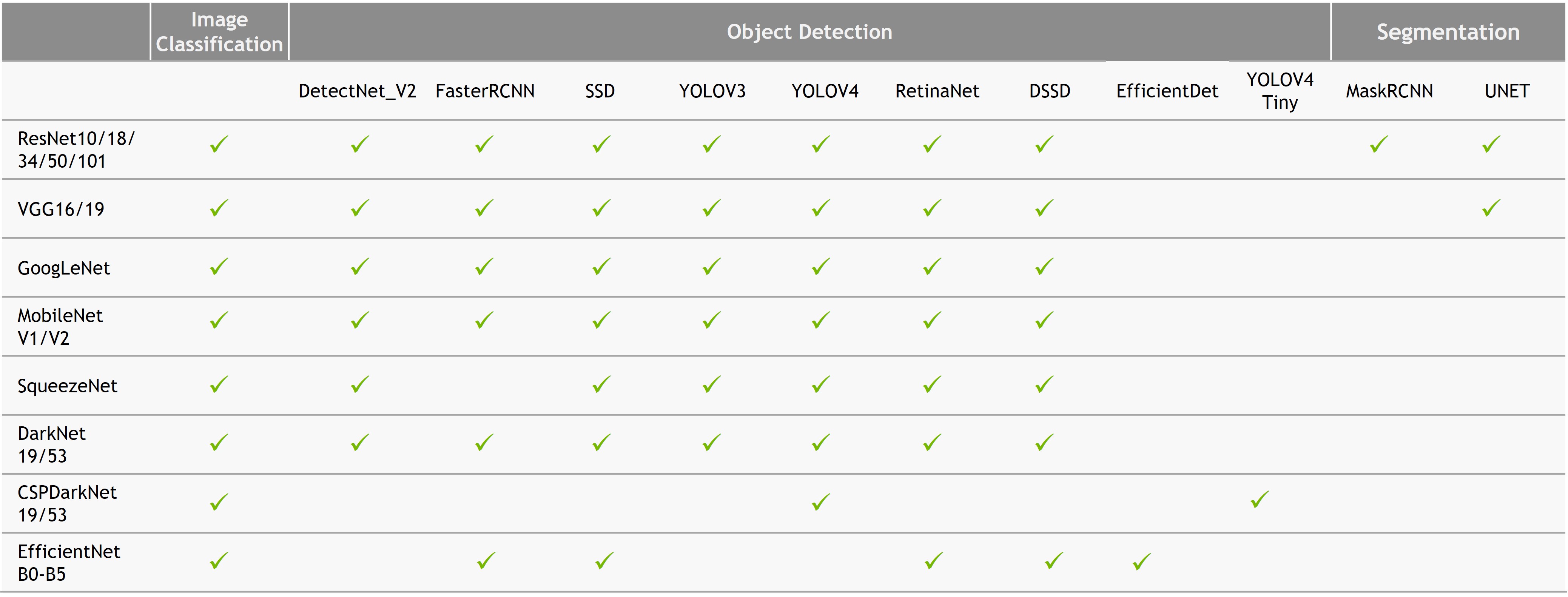
More details on specific Computer Vision based model can be viewed in CV Applications section: https://docs.nvidia.com/tao/tao-toolkit/index.html
Launching TAO toolkit
When launching TAO toolkit, it is important to check:
- Whether the installed docker NVIDIA CUDA and the host system NVIDIA CUDA are the same version.
If the version of each CUDA are different, it is recommended to remove the old NVIDIA CUDA driver and install the matching driver on the host machine.
This is because, since TAO is updated regularly the CUDA version required for the docker is constantly updated. With an older version, the length of functionality may be limited.
Make sure that the TAO toolkit is operational by:
tao --helpThis allows users to see if the TAO is installed properly and the different types of functions available for TAO.
TAO launcher configuration
Every TAO execution is run with the mount configuration (launch instance) (
tao_mounts.json).The need for mounts stems from the need to locate dataset which may be in a larger database, foreign to the host machine. Each TAO execution/ project may use different configurations of launch instances, hence it is recommended to re-create the launch instance at every new project execution.
The launcher configuration file (
tao_mounts.json) consists of 3 sections:- Mounts
Mounts parameter defines the path in the local machine and the path that should be mapped to the docker.
- Envs
- Environment parameter defines the variables that will be linked to the TAO Toolkit, and will have dictionary containing two key-values:
Variable: The name of the environment variable.
Value: the value of the environment value.
The environments may include:
ClearML:
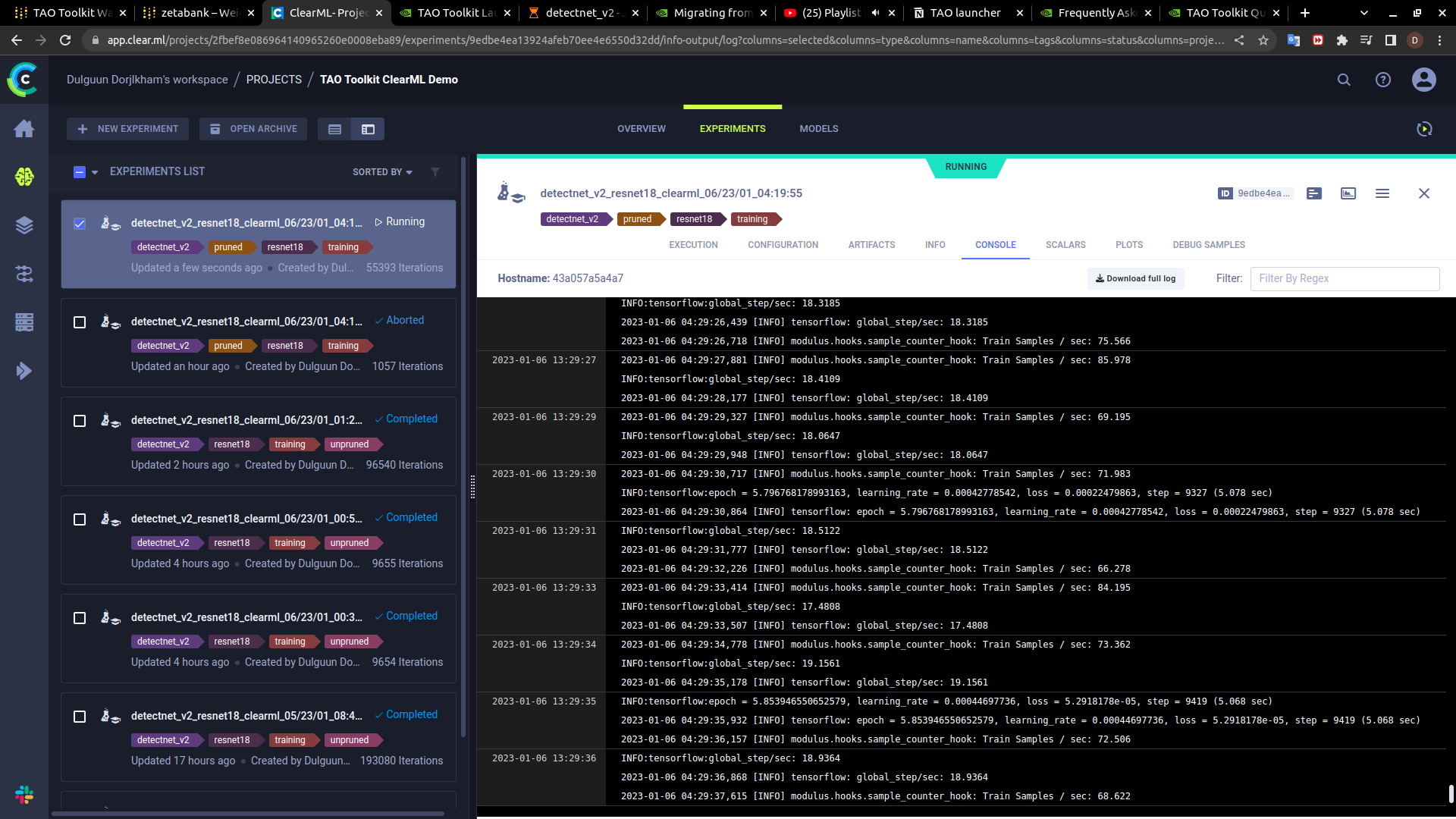 Which includes comprehensive live results of the model progress. From Average precision of each of the class, overall cost of the model throughout the iteration, the ClearML will monitor and log each step of the model.
Wandb:
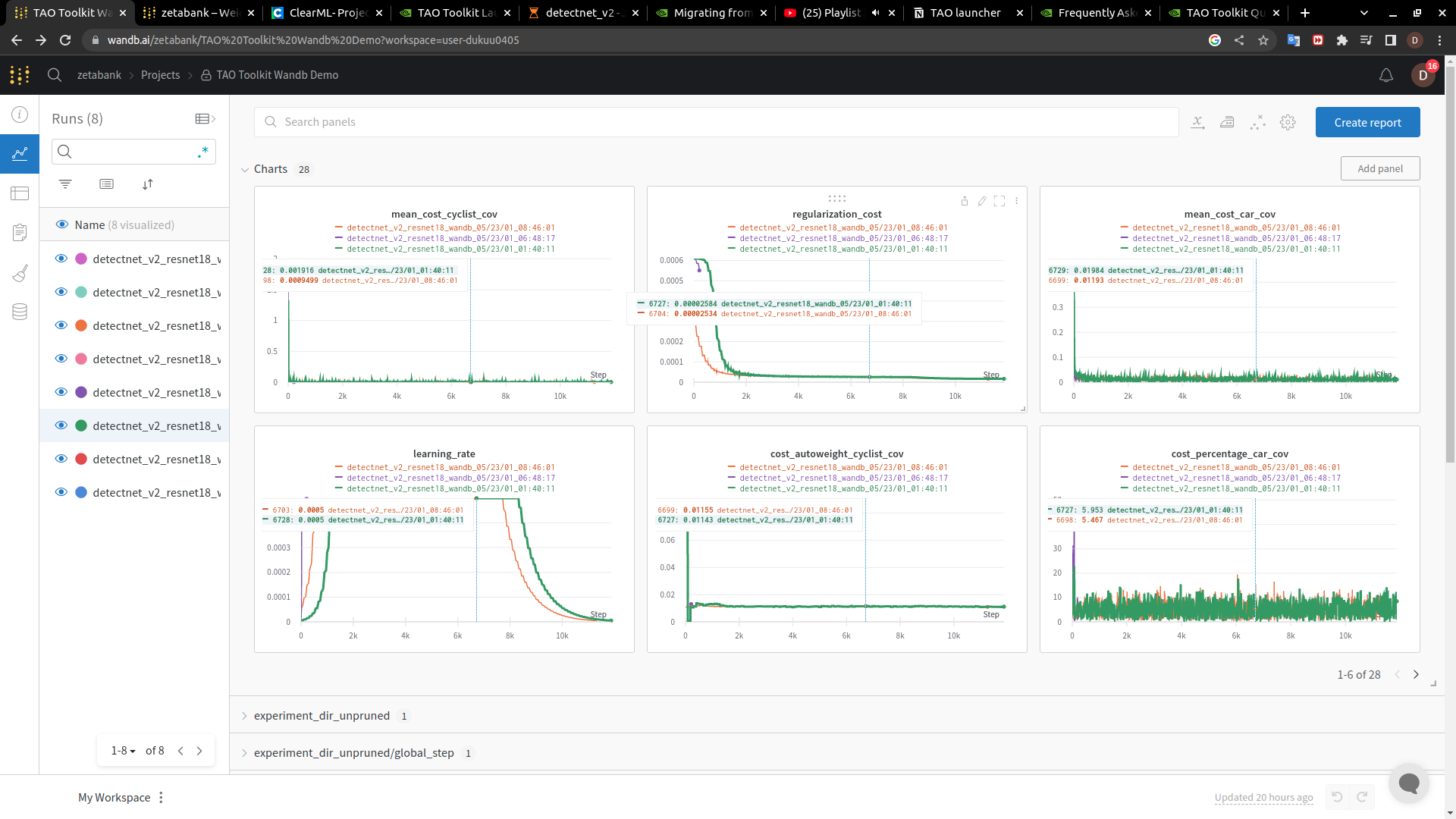 Similar to ClearML, wandb allows for live logging and monitoring of the Model and hardware used for the model.
(NOTE!!!) If it is necessary to define user and gid within the nvidia docker environment, do not use wandb as it required root access to the project environment.
Docker Options
DockerOptions parameter allows to control the option setting required when evoking the docker command. The amount of control which can be set are:
shm_size: Defines the shared memory size of the docker. If this parameter isn’t set, then the TAO Toolkit instance allocates 64MB by default. We recommend setting this as"16G", thereby allocating 16GB of shared memory.ulimits`: Defines the user limits in the docker. This parameter corresponds to the ulimit parameters in/etc/security/limits.conf. We recommend users setmemlockto1andstackto67108864.user: Defines the user id and group id of the user to run the commands in the docker. By default, if this parameter isn’t defined in the~/.tao_mounts.jsonthe uid and gid of the root user. However, this would mean that when directories created by the TAO dockers would be set to root permissions. If you would like to set the user in the docker to be the same as the host user, please set this parameter as “UID:GID”, where UID and GID can be obtained from the command line by runningid -uandid -g.ports: This parameter defines the ports in the docker to be mounted to the host
Example Config
{
    "Mounts": [
        {
            "source": "/home/zeta/getting_started_v4.0.0/notebooks/tao_launcher_starter_kit/detectnet_v2",
            "destination": "/workspace/tao-experiments"
        },
        {
            "source": "/home/zeta/getting_started_v4.0.0/notebooks/tao_launcher_starter_kit/detectnet_v2/specs",
            "destination": "/workspace/tao-experiments/detectnet_v2/specs"
        }
    ],
    "DockerOptions": {
        "user": "1000:1000"
    },
    "Envs": [
        {
            "variable": "CLEARML_WEB_HOST",
            "value": "https://app.clear.ml"
        },
        {
            "variable": "CLEARML_API_HOST",
            "value": "https://api.clear.ml"
        },
        {
            "variable": "CLEARML_FILES_HOST",
            "value": "https://files.clear.ml"
        },
        {
            "variable": "CLEARML_API_ACCESS_KEY",
            "value": "9E7HPH358MZ5GK9RP1MB"
        },
        {
            "variable": "CLEARML_API_SECRET_KEY",
            "value": "4zamUwmWZHV706OP6lTGcLuTXUZcSz8X0bElSVROpuuysoh0ob"
        }
    ]
}
Example Config 2 (NVIDIA Example):
{
    "Mounts": [
        {
            "source": "/path/to/your/data",
            "destination": "/workspace/tao-experiments/data"
        },
        {
            "source": "/path/to/your/local/results",
            "destination": "/workspace/tao-experiments/results"
        },
        {
            "source": "/path/to/config/files",
            "destination": "/workspace/tao-experiments/specs"
        }
    ],
    "Envs": [
        {
            "variable": "CUDA_DEVICE_ORDER",
            "value": "PCI_BUS_ID"
        }
    ],
    "DockerOptions": {
        "shm_size": "16G",
        "ulimits": {
            "memlock": -1,
            "stack": 67108864
        },
        "user": "1000:1000",
        "ports": {
            "8888": 8888
        }
    }
}
TAO Running tasks
TAO toolkit allows for training, re-training, pruning, converting / pre-processing the data into tf format. Basic command line format is:
tao <task> <subtask> <cli_args>
You may open docker CLI environment with
tao <task>. In case of Detectnet_v2 the CLI environment was accessed withtao detectnet_v2Make sure to see all the available command line arguments that can be run with the specific task one is about to have.
tao <task> --helpEx)
$ tao detectnet_v2 --help

Using TensorFlow backend.
usage: detectnet_v2 [-h] [--gpus GPUS] [--gpu_index GPU_INDEX [GPU_INDEX ...]]
                    [--use_amp] [--log_file LOG_FILE]
                    {calibration_tensorfile,dataset_convert,evaluate,export,inference,prune,train}
                    ...

TAO Toolkit

optional arguments:
-h, --help            show this help message and exit
--gpus GPUS           The number of GPUs to be used for the job.
--gpu_index GPU_INDEX [GPU_INDEX ...]
                        The indices of the GPU's to be used.
--use_amp             Flag to enable Auto Mixed Precision.
--log_file LOG_FILE   Path to the output log file.

tasks:
{calibration_tensorfile,dataset_convert,evaluate,export,inference,prune,train}
TAO Detectnet_v2 Model running Example
!tao detectnet_v2 train -e $SPECS_DIR/detectnet_v2_train_resnet18_kitti.txt \
                        -r $USER_EXPERIMENT_DIR/experiment_dir_unpruned \
                        -k $KEY \
                        -n resnet18_detector \
                        --gpus $NUM_GPUS
task: detectnet_v2sub_task: traincli_args:-e: specs file for the training parameters-r: Output location for the experiment-k: key for the experiment.(Note!!!) most of the tao pre-trained models have the same key of `tao_encode`
-n: Name of the output model--gpus: Number of GPU.(Note!!!) TAO allows for multiprocessing, but in order to enable the access to this function, the mount configuration file as well as the model spec file must be edited.
(IMPORTANT!!!):
If you wish to train (or do any training related sub-tasks) remove all the previously created files within:
$USER_EXPERIMENT_DIR/experiment_dir_nameIf this is not done, the project will result in FAIL at the last iteration of the training.!!!!rm -rf $USER_EXPERIMENT_DIR/experiment_dir_name/*
This is especially important if you wish to run multiple different variation of the model with different hyper_parameters. **Currently TAO does not support any automatic hyper-parameter tuner, instead offers sample hyper-parameters ** https://forums.developer.nvidia.com/t/hyperparameter-optimization/194174/2
Handling Launched Processes
Once the TAO project is launched, container is activated. This container is active until the given task is finished.
In order to see the current running task, run
tao list.$ tao list ============== ================== ============================================================================================================================================================================================= container_id container_status command ============== ================== ============================================================================================================================================================================================= 5316a70139 running detectnet_v2 train -e /workspace/tao-experiments/detectnet_v2/experiment_dir_unpruned/experiment_spec.txt -k tlt_encode -r /workspace/tao-experiments/detectnet_v2/experiment_dir_unpruned ============== ================== =============================================================================================================================================================================================
If the TAO launch is failed or if the container is not terminated after the activation, you may terminate the container with
tao stopcommand.usage: tao stop [-h] [--container_id CONTAINER_ID [CONTAINER_ID ...]] [--all] {info,list,stop,augment,classification,classifynet,detectnet_v2,dssd,emotionnet,faster_rcnn,fpenet,gazenet,heartratenet,intent_slot_classification,lprnet,mask_rcnn,punctuation_and_capitalization,question_answering,retinanet,speech_to_text,ssd,text_classification,converter,token_classification,yolo_v3,yolo_v4,yolo_v4_tiny} ... optional arguments: -h, --help show this help message and exit --container_id CONTAINER_ID [CONTAINER_ID ...] Ids of the containers to be stopped. --all Kill all TAO Toolkit running TAO Toolkit containers. tasks: {info,list,stop,augment,classification,classifynet,detectnet_v2,dssd,emotionnet,faster_rcnn,fpenet,gazenet,heartratenet,intent_slot_classification,lprnet,mask_rcnn,punctuation_and_capitalization,question_answering,retinanet,speech_to_text,ssd,text_classification,converter,token_classification,yolo_v3,yolo_v4,yolo_v4_tiny}
To stop a specific container(s):
tao stop --container_id <specific_container_id1>, <specific_container_id2>, ...
(more information may be accessed in: https://docs.nvidia.com/tao/tao-toolkit/text/tao_launcher.html)